
Introduction
When deploying modern applications, scalability and reliability are essential. A React frontend paired with a Django backend is a popular stack for building robust web applications. However, as traffic grows, a single server may not handle the load efficiently. This is where load balancing on AWS becomes crucial.
In this blog, we’ll cover how to set up a load-balanced architecture for a React + Django app on AWS using services like Elastic Load Balancer (ELB), Auto Scaling Groups (ASG), and Amazon S3 + CloudFront.
Why Load Balancing?
Load balancing distributes traffic across multiple servers, ensuring:
- High availability – if one server fails, traffic is rerouted.
- Scalability – automatically handle spikes in user requests.
- Improved performance – reduce latency by routing traffic to the nearest healthy instance.
Architecture Overview
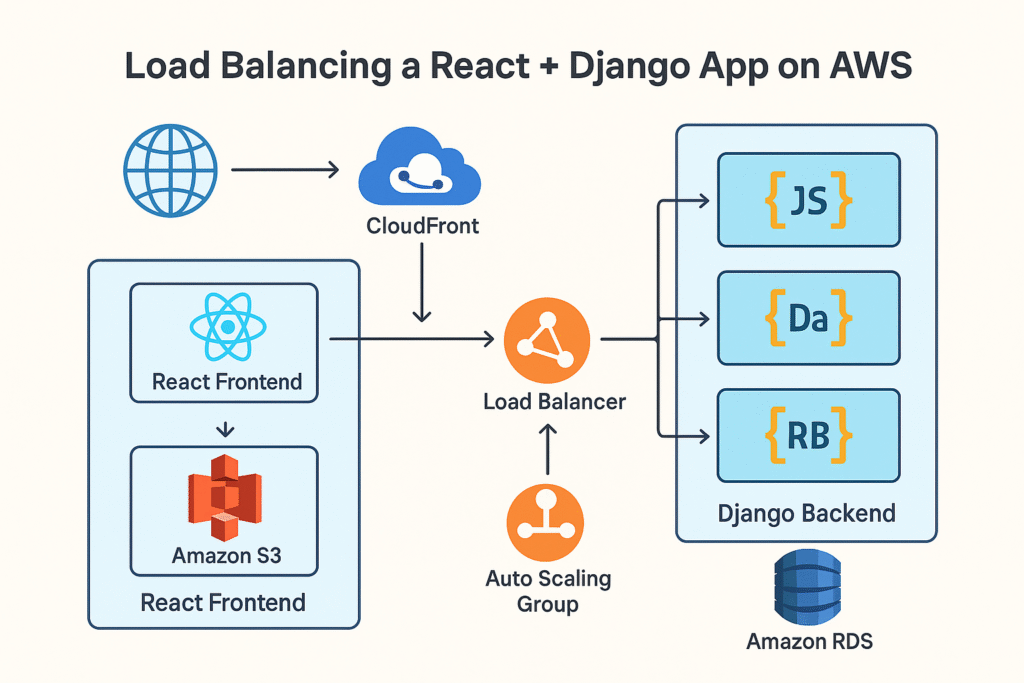
The high-level architecture looks like this:
- React Frontend:
- Hosted on Amazon S3 as a static website.
- Delivered globally using CloudFront CDN for speed and caching.
- Django Backend:
- Runs on EC2 instances (or ECS with Docker).
- Managed by an Auto Scaling Group (ASG).
- Behind an Application Load Balancer (ALB) for intelligent routing.
- Database:
- Use Amazon RDS (PostgreSQL/MySQL) or Amazon Aurora for managed database services.
Step 1: Hosting React on AWS S3 + CloudFront
- Build your React app:
npm run buildThis generates static files in thebuild/folder. - Create an S3 bucket and enable static website hosting.
- Upload the build files:
aws s3 sync build/ s3://your-bucket-name - Set up CloudFront to serve your React app globally with caching and SSL.
Step 2: Deploying Django Backend on EC2
- Launch an EC2 instance (Amazon Linux 2 or Ubuntu).
- Install dependencies:
sudo apt update sudo apt install python3-pip python3-venv nginx -y - Set up a Python virtual environment and install Django + Gunicorn:
python3 -m venv venv source venv/bin/activate pip install django gunicorn - Configure Gunicorn to serve your Django app.
- Set up Nginx as a reverse proxy.
Step 3: Setting Up Load Balancer
- Go to AWS EC2 → Load Balancers.
- Create an Application Load Balancer (ALB).
- Configure:
- Listeners: Port 80 (HTTP) or Port 443 (HTTPS with SSL).
- Target Group: Add your Django EC2 instances.
- Test by accessing the ALB DNS – requests should be routed to your backend.
Step 4: Auto Scaling for Django
- Create an Auto Scaling Group (ASG) linked to your ALB.
- Define scaling policies:
- Example: Add a new instance if CPU > 70%.
- Terminate instances if CPU < 30%.
- This ensures your backend scales automatically with traffic.
Step 5: Connecting React Frontend to Django Backend
- In React’s
.envfile:REACT_APP_API_URL=https://your-alb-dns-name.amazonaws.com - Rebuild and redeploy your React app to S3 + CloudFront.
- Now, frontend API calls will route through the load balancer to Django servers.
Step 6: Database and Security
- Use Amazon RDS for PostgreSQL/MySQL to avoid managing databases manually.
- Apply Security Groups to:
- Allow traffic from ALB to Django EC2.
- Restrict DB access only to Django EC2 instances.
- Enable HTTPS with AWS Certificate Manager (ACM) for secure communication.
Step 7: Monitoring and Logging
- Enable CloudWatch Metrics for CPU, memory, and request counts.
- Use CloudWatch Logs to capture Django + Nginx logs.
- Optionally, integrate with AWS X-Ray for distributed tracing.
Best Practices
- Always enable HTTPS for security.
- Cache static assets via CloudFront.
- Use Elastic File System (EFS) if you need shared storage across instances.
- Implement CI/CD pipelines with GitHub Actions or AWS CodePipeline.
Conclusion
By combining AWS S3 + CloudFront for React and EC2 + ALB + ASG for Django, you create a scalable, fault-tolerant architecture. This setup ensures your React + Django app can handle traffic spikes while maintaining high availability and performance.
With AWS’s managed services, you spend less time worrying about infrastructure and more time building features for your users.